Init(args) can automatically optimize the order in which components that are loaded as part of the same scene or prefab are initialized, based on their dependencies.
Why Init Order Matters
Imagine you have a component called Client which needs to execute a method on another component called Service when it’s being enabled:
class Client : MonoBehaviour<Service>
{
   Service service;

   protected override void Init(Service service) => this.service = service;

   void OnEnable() => service.DoSomething();
}
Is this safe to do? What if Client’s OnEnable happens to get executed before Service’s Awake and OnEnable events do, and Service.DoSomething actually can’t safely be used yet?
class Service : MonoBehaviour
{
    bool initialized;
    void Awake() => Initialize();

    public void DoSomething()
    {
        if(!initialized) throw new Exception("Not initialized yet!");

        ...
    }

    void Initialize()
    {
        initialized = true;

        ...
    }
}
Normally, if you were to connect the two components using serialized fields or GetComponent in Unity, they would get loaded in arbitrary order by default – meaning, Client might or might not throw an exception when its tested at runtime. And perhaps it might even work when tested in the Editor, but fail in your release build.
Solution: Automatic Init Order Optimization
Init(args) can automatically optimize the initialization order of all components that derive from MonoBehaviour<T...> and execute code during the Awake or OnEnable events, based on the components that they depend on.
So if A depends on B, and A executes any code during Awake or OnEnable, then Init(args) will automatically ensure B’s Awake and OnEnable methods are executed before A’s are.
Configuration
Automatic Init Order optimization can be customized or turned off in Project Settings > Init(args).
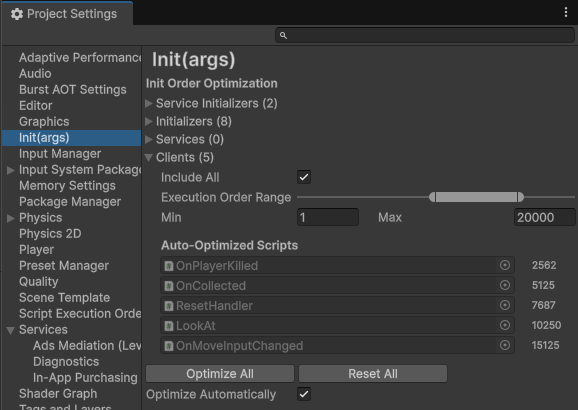
Include All
The Include All toggle determines whether Init(args) will optimize the script execution orders of all components belonging the category, whenever either the Optimize All button is pressed manually or when the Optimize Automatically option is enabled.
Execution Order Range
Determines the minimum and maximum script execution order for all scripts belonging to the category.
The default script execution order of scripts is 0, and scripts with negative values get executed before that, and scripts with positive values get executed after that.
Optimize All
Pressing the Optimize All button causes the script execution order of all scripts belonging to all categories with Include All enabled to get re-optimized.
Reset All
Pressing the Reset All button will cause Script Execution Order of all scripts that Init(args) automatically optimizes back to their default state (0).
Tip: You may want to use this after changing the Execution Order Range for a category, so that script execution orders of scripts get spread out evenly along the whole range.
Optimize Automatically
When enabled, Init(args) will automatically detect when new scripts are being imported and trigger script execution orders to be re-optimized as a result.