The Any<TValue> type can be used to create serialized fields into which you can assign any objects of the given type using the Inspector.
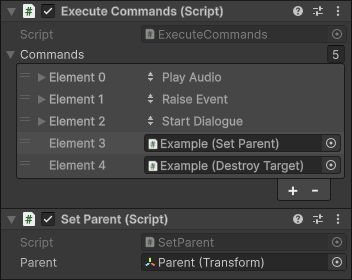
Any<ICommand>[] field filled with different types of values
- Plain-old C# class
- UnityEngine.Object
- An interface type
You’ll be able to select any assignable value for the serialized field using the Inspector, and it will be serialized for you.
Service Support
If a service has the defining type TValue, then serialized fields of type Any<TValue> will automatically receive a reference to the service.
You are however still able to manually drag-and-drop some other Object into the field, to use that instead of the default Service instance.
Value Provider Support
Value provider components and scriptable objects that can provide a value of type TValue can be drag-and-dropped into a serialized field of type Any<TValue>.
Value provider scriptable objects that have the [ValueProviderMenu] attribute set to target fields of type TValue will appear in the dropdown menu next to serialized field of type Any<TValue>.
Example
If you wanted to make it possible to assign any object that implements the IInteractable interface using the Inspector, you could add a member field of type Any<IInteractable> to your component class:
[SerializeField] Any<IInteractable> interactable;
You can then use the Value property or the GetValue(Component client) method to acquire the value from the Any<TValue> field.
[SerializeField] Any<IInteractable> interactable;

IInteractable Interactable => interactable.GetValue(this);

public void Interact() => interactable.Interact(this);
You will need to use the GetValue method and pass in the the client in order to support acquiring local services and to get values from Value Providers that provide client-specific values, such as GetComponent.
Use Cases
Initializers already use Any<TValue> fields internally. This means that you typically won’t need to define Any<TValue> fields directly in your MonoBehaviour<T…> clients.
However, there can still occasionally be situations where using Any<TValue> fields directly could be useful.
Value Providers
since value providers can return client-specific values, can support resolving values lazily, and can sometimes be drawn embedded inside the Init sections of client components within a limited space, it can make sense to use Any<TValue> fields in value providers directly.
class GetParentOfTarget : MonoBehaviour, IValueProvider
{
	[SerializeField] Any<Transform> target;

	public Transform Value => null;

	public bool TryGetFor(Component client, out Transform parent)
	{
		parent = target.GetValue(client);
		return parent != null;
	}
}
InitializerBase<T…>
While usually the Initializers you generate for clients will derive from an Initializer<T...> base class, and already use Any<TValue> fields directly to resolve all the Init arguments, in rare occasions you might want to create an initializer which derives from InitializerBase<T...> instead, and specifies how the Init arguments should resolved manually. In such situations it might sometimes be useful to define some Any<TValue> fields manually in the initializer.
class EnemyInitializer : InitializerBase<Enemy, Transform>
{
	[SerializeField] Any<Player[]> players;

	protected override Transform Argument
	{
		get => GetNearestPlayer();
		set { }
	}

	private Transform GetNearestPlayer()
		=> players.GetValue(this)
		.OrderBy(player => Vector3.Distance(player.transform.position, transform.position))
		.FirstOrDefault()?.transform;
}