Issue
An client component does not receive the objects that it depends on in its Init method during its initialization.

Cause: Not All Dependencies Are Services
One possible reason for this is that the component depends on one or more objects that have not been registered as services.
Components that derive from MonoBehaviour<T…> can only automatically receive all the objects that they depend on in their Init method, if all the objects are registered services that are accessible to the client.
Solution 1: Register Missing Services
You can fix the issue by registering all the missing dependencies as services.
This can be done using the [Service] attribute, Service Tags and Services components.
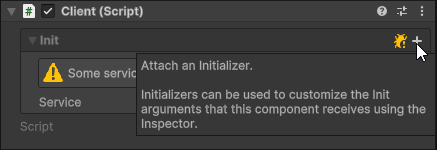
Solution 2: Attach an Initializer
Instead of having the client receive objects that have been registered as shared local or global services, it’s also possible to configure its Init arguments manually using the Inspector window.
This can be achieved by generating an Initializer for the client and attaching it to it.

After this you can assign Init arguments using drag-and-drop or by selecting values from their dropdown menus.
You can also use value providers with initializers to resolve Init arguments dynamically at runtime.
Cause: Service Not Accessible To Client
One possible reason is that a service that has been registered using a Service Tag or a Services component has been configured to not be accessible to the client, due to its location in the scene hierarchies.
Solution: Change Service Tag Availability
To change which clients can receive a service registered using a Service Tag, click on the tag in the Inspector, and select an Availability level for the service which makes it available to the client.

Solution 2: Change Services Availability
To change which clients can receive the services registered using a Services component, click on the For Clients dropdown in the Inspector, and select an Availability level for the services which makes them available to the client.

Cause: Service Only Available At Runtime
In some cases a service could be missing in Edit Mode, but become available at runtime.
In particular, this can happen with scene and prefab based services that are registered as services using a Service Tag or a Services component, if the client and the service are loaded as part of different scenes or prefabs.
Because Init(args) might not always know that the service will be available at runtime, it might log warnings to the Console and display warnings in the Inspector in Edit Mode unnecessarily by default.
Solution 1: Wait For Service
One way to get rid of the warning is to:
- Attach an initializer to the component.
2. Pick ‘Wait For Service’ from the Init argument’s dropdown menu.


This will cause the Null Argument Guard to treat the Init argument as not missing.
If the service does not exist at runtime at the moment when the initializer is loaded, the initializer will disable the client component and delay its initialization, until the service has become available.
Solution 2: Disable Edit Mode Warnings
Another possible solution is to turn off Edit Mode Warnings from the Null Argument Guard’s dropdown menu.
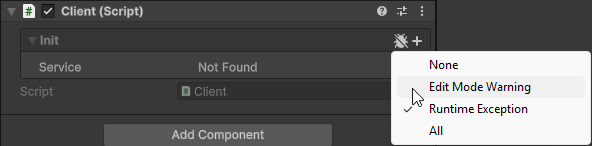
This will stop warnings about the missing Init argument from being logged to the Console in Edit Mode, and the Inspector from displaying warnings as well.
You will however still continue seeing something like ‘Not Found’ shown next to the Init argument in the Init section when it is unfolded. If you want to avoid this, consider using the Wait For Service based solution instead.
Cause: Asynchronously Initialized Service
You have a client that depends on a service which is initialized asynchronously.
For example, the service could be registered from an addressable asset using the [Service] attribute with LoadAsync set to True.
Solution: Wait For Service
- Attach an initializer to the component.
2. Pick ‘Wait For Service’ from the Init argument’s context menu.
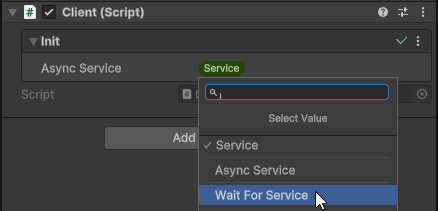

After this, if the service is still in the process of being loaded at the moment when the initializer is loaded, the initializer will disable the client component and delay its initialization, until the service has become available.
Cause: Service Type Mismatch
One possible reason is that one of the client’s Init parameters’ types do not exactly match any of the types with which the service in question has been registered.
If you do not explicitly specify the type to use for registering a service with the [Service] attribute, then the concrete type of the service is used by default.
❌ Wrong
[Service]
public class MyService : IService { }

public class MyClient : MonoBehaviour<IMyService>
{
    protected override void Init(IMyService myService) => ...
}
Solution: Change Service Type
To fix the issue, you can pass the correct type to [Service] attribute as its first argument.
✅ Correct
[Service(typeof(IService))]
public class MyService : IService { }

public class MyClient : MonoBehaviour<IMyService>
{
    protected override void Init(IMyService myService) => ...
}
NOTE: You can also list multiple service types using one Service attribute.
Cause: using Awake
One possible reason for this, is that an Awake method has been defined in the client’s class. If this is is done, it will prevent the Awake method in the base class from being called.
If the error originates from an Awake method, this is likely to be the source of the problem:
NullReferenceException: Object reference not set to an instance of an object
MyComponent.Awake () (at Assets/Scripts/MyComponent.cs:12)
Solution: use OnAwake
To fix the issue, change the void Awake() definition to protected override void OnAwake().
❌ Wrong
public class MyClient : MonoBehaviour<MyService>
{
    MyService myService;

    protected override void Init(MyService myService) => this.myService = myService;

    void Awake() => myService.DoSomething();
}
✅ Correct
public class MyClient : MonoBehaviour<MyService>
{
    MyService myService;
    protected override void Init(MyService myService) => this.myService = myService;

    protected override void OnAwake() => myService.DoSomething();
}
The OnAwake method is called at the end of the Awake event for the component, after the component has received the objects that it depends on via its Init method.
Cause: Script Execution Order Issue
If you are instantiating some services manually in code during initialization of a scene, or when transitioning between scenes, then it could be that the issue is that the clients initialization logic gets executed before your code that creates the services does.
Solution: InitOrder
To fix the issue, you can change the script execution order setting for the class that creates the services to be very early, before any clients or their initializers are loaded.
This can be done by adding the InitOrder attribute to the class. It has identical behaviour to the built-in DefaultExecutionOrder attribute, but its parameters offer some more guidance on how different execution order values relate to those of other types of components.
using Sisus.Init;
using UnityEngine;

[InitOrder(Category.ServiceInitializer, Order.VeryEarly)]
public class ServicesLoader : MonoBehaviour
{
    [SerializeField] GameObject servicesPrefab;

    void Awake() => Instantiate(servicesPrefab);
}
Cause: Invalid Service Type
One possible reason is that a service is registered using a type, which the registered class can not be cast to.
The service class type should always either exactly match the type using which it is registered, derive from that type (in the case of base classes), or implement that type (in the case of interfaces).
❌ Wrong
[Service(typeof(IService))]
public class MyService { }

public class MyClient : MonoBehaviour<IMyService>
{
    protected override void Init(IMyService myService) => ...
}
Solution: Make Service Type Valid
To fix the issue, change either the [Service] attribute’s type argument, or the definition of the service class, so that the service class becomes castable to the type used to register it.
✅ Correct
[Service(typeof(IService))]
public class MyService : IService { }

public class MyClient : MonoBehaviour<IMyService>
{
    IMyService myService;

    protected override void Init(IMyService myService) => this.myService = myService;
}
Cause: Wrapped Object Is Null
One possible reason is that the service is a plain old C# object wrapped by a Wrapper component, but the wrapped object instance has not been created yet.
Solution 1: [Serializable]
One way to solve the issue is by adding the [Serializable] attribute to the plain old C# object’s class. This way Unity will automatically create the instance for you during the deserialization phase.
[AddComponentMenu("Wrapper/Player")]
public class PlayerComponent : Wrapper<Player> { }

[Serializable]
public class Player { }
Solution 2: Parameterless Constructor
Another way to solve the issue is by creating the plain old C# object in the wrapper’s constructor:
- Define a parameterless constructor in the Wrapper class.
- Create the plain old C# object.
- Pass the plain old C# object to the base constructor.
[AddComponentMenu("Wrapper/Player")]
public class PlayerComponent : Wrapper<Player>
{
    public PlayerComponent() : base(CreatePlayer()) { }

    private Player CreatePlayer() => new Player();
}
Solution 3: WrapperInitializer
If you need some services to be able to construct the plain old C# object, then you can generate a WrapperInitializer, and implement the CreateWrappedObject method, and attach it to your wrapper.
public class PlayerInitializer : WrapperInitializer<PlayerComponent, Player, IInputManager>
{
    protected override Player CreateWrappedObject(IInputManager inputManager) => new Player(inputManager);
}
Cause: Optional Dependency Injection
In some cases you might want to have a component that derives from MonoBehaviour<T…>, but injecting services to it via its Init method is optional, at least in some circumstances.
For example, it might be required that services are injected when an instance is created at Runtime via AddComponent (for example to facilitate easy testing with services replaced with test double), but if the service exists as part of a scene or a prefab, then normal serialized fields could be used to resolve those services instead:
public class MyClient : MonoBehaviour<MyService>
{
    [SerializeField] MyService myService;

    protected override void Init(MyService myService) => this.myService = myService;
}
You might also have a client that will fallback to using some default services if no custom services were injected to it from the outside:
public class MyClient : MonoBehaviour<ILogger>
{
    ILogger logger;

    protected override void Init(ILogger logger) => this.logger = logger;
    protected override void OnAwake() => logger ??= new DefaultLogger();
}
How can you configure Init(args) to not warn you incorrectly about missing dependencies in such situations?
Solution 1: Self-Init
Step 1: Override Init(Context)
Components that derive from MonoBehaviour<T…> have a void Init(T…) method through which all the services that they depend on can be injected to them from the outside – but they also have a bool Init(Context) method which they can use to try and resolve those services internally.
You can override the bool Init(Context) method and make it return true if the component has access to all the services that it needs, even if they were never injected to it via the Init method:
public class MyClient : MonoBehaviour<MyService>
{
    [SerializeField] MyService myService;

    protected override void Init(MyService myService) => this.myService = myService;
    protected override bool Init(Context context)
    {
        // Check if service has been provided via Init method.
        if(base.Init(context))
        {
            return true;
        }

        // Check if services has been provided via serialized field.
        return myService != null;
    }
}
public class MyClient : MonoBehaviour<ILogger>
{
    ILogger logger;

    protected override void Init(ILogger logger) => this.logger = logger;

    protected override bool Init(Context context)
    {
        // Check if service has been provided via Init method.
        if(base.Init(context))
        {
            return true;
        }

        // Fallback to default service.
        logger ??= new DefaultLogger();
        return true;
    }
}
Step 2: Disable Edit Mode Warnings
In addition to this, you might also need to turn off Edit Mode Warnings from the Null Argument Guard’s dropdown menu.
This will stop warnings about the missing Init argument from being logged to the Console in Edit Mode, and the Inspector from displaying warnings as well.
Step 3: Hide Init Section (Optional)
Even after disabling Edit Mode Warnings, you will still continue seeing something like ‘Not Found’ shown next to the Init argument in the Init section when it is unfolded, which could be misleading. If you want to avoid this, you can hide the Init Section entirely by disabling Show Init Section in the context menu of the component:

Solution 2: Create an Initializer
An alternative approach to handling optional services could be to use an Initializer instead.
You can create an Initializer that derives from InitializerBase<TClient, T…> instead of Initializer<TClient, T…> to gain complete control over how exactly each Init argument is resolved:
public sealed class MyClientInitializer : InitializerBase<MyClient, ILogger>
{
    static readonly DefaultLogger<MyClient> DefaultLogger = new();
    static readonly DebugLogger<MyClient> DebugLogger = new();
    static readonly NullLogger NullLogger = new();

    [SerializeField] private LoggerType loggerType = LoggerType.Default;

    protected override ILogger Argument
    {
        get => loggerType switch
        {
            LoggerType.Debug => DebugLogger,
            LoggerType.Null => NullLogger,
            _ => DefaultLogger
        };

        set => loggerType = value?.LoggerType ?? LoggerType.Default;
    }
}