What Are Value Providers?
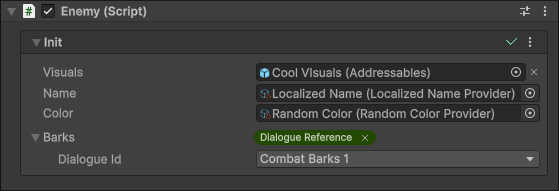
Value providers are a flexible system that can be used to resolve Init arguments dynamically at runtime.
Value providers are ScriptableObjects and components that implement IValueProvider<TValue> or IValueByTypeProvider – or their asynchronous counterparts, IValueProviderAsync<TValue> or IValueByTypeProviderAsync.
Use Cases
There are a lot of possible use cases for value providers – here are a few examples to get your imagination running:
- Addressables – Load addressable assets asynchronously before passing them to clients, all ready to be used. The initializer will automatically make sure that the client remains disabled until the addressable has been loaded.
- Localization – Localize texts before passing them to clients. All your various client components don’t need to worry about which localization solution you happen to be using in the project.
- Randomization – Randomize any Init arguments you want (names, color palettes, character customization options…).
- Databases – Fetch values from databases at runtime.
- Object pooling – Reuse objects from a pool, and take them back when the client is destroyed to avoid garbage generation.
- UI Elements – query VisualElements from a PanelRenderer.
- Per-Client Services – Make sure that different instances of the same service type get provided for all clients.
- Dropdown menu items – The [ValueProviderMenu] attribute can be used to add new items into Init argument dropdown menus for easily assigning value providers into them.
Using Value Providers
To receive a value from a value provider, create a component that derives from MonoBehaviour<T…> and has an Init argument whose type matches the value provided by a value provider.
using Sisus.Init;

class StringClient : MonoBehaviour<string>
{
    protected override void Init(string name) => gameObject.name = name;
}
Then generate an Initializer for the component using the + button in the Init section.
After this simply drag-and-drop a value provider asset or component into the Init argument field in the Inspector window.
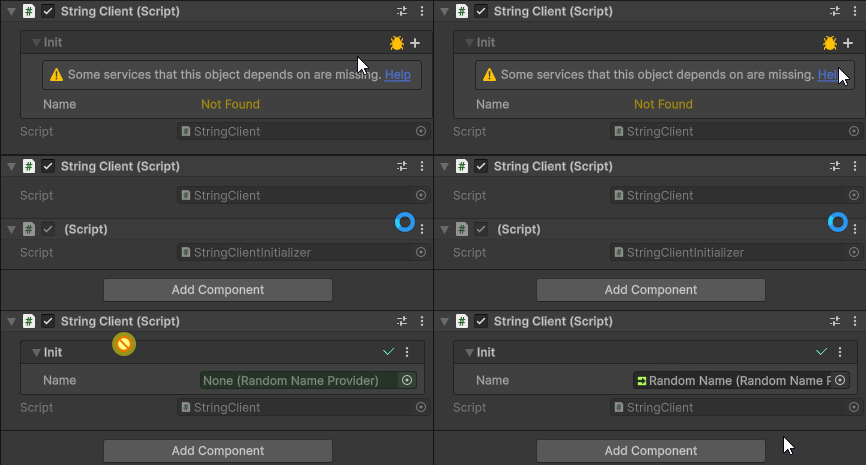
In addition to using Initializers, you can also assign value providers into Any<TValue> fields.
If a value provider has the [ValueProviderMenu] attribute, then you can assign them conveniently from Init arguments’ dropdown menus.
Value providers can also be combined with the [Service] attribute to create per-client service providers.
Creating Value Providers
Types Of Value Providers
Which interface you should implement depends on how many types of values your value provider can provide, and whether providing a value requires waiting for something to happen, such as an asset being loaded.
| Interface | Provides | Use it when |
|---|---|---|
IValueProvider<TValue> |
A single, specific type of value. | The value can be returned immediately, and the type is known at compile time. For example a random name, or the main camera. |
IValueByTypeProvider |
Values of many different types – whichever type the client asks for. | The value can be returned immediately, but the same provider should work for many different Init argument types. For example GetComponent-style lookups. |
IValueProviderAsync<TValue> |
A single, specific type of value, asynchronously. | Getting the value requires waiting. For example loading an addressable asset or fetching data from a database. |
IValueByTypeProviderAsync |
Values of many different types, asynchronously. | Getting the value requires waiting, and the same provider should work for many different Init argument types. For example waiting for a service to become available. |
In addition to these, there are some optional interfaces that can be added to a value provider to enable additional functionality:
INullGuardandINullGuardByType– let the value provider tell the Inspector when it will not be able to provide a value to a client. See Validating Value Providers and Validating Values Provided By Type.IValueReleaser<TValue>andIValueByTypeReleaser– let the value provider take back a value once the client that received it no longer needs it (i.e. is destroyed). See Releasing Values.
IValueProvider<TValue>
Value providers are most typically scriptable objects, but they can also be components.
To make a new scriptable object value provider, create a class that derives from ScriptableObject and implements IValueProvider<TValue>.
To create an asset from the value provider, also add the [CreateAssetMenu] attribute to it.
At a minimum a value provider has to implement the Value property from the IValueProvider<TValue> interface.
You can also optionally implement the TryGetFor method to support customizing the returned value based on the client requesting it or to support situations where the value provider might not always be able to provide a value.
using Sisus.Init;
using UnityEngine;

[CreateAssetMenu]
class RandomNameProvider : ScriptableObject, IValueProvider<string>
{
    [SerializeField] string[] names = { };

    public string Value => names.Length is 0 ? null : names[Random.Range(0, names.Length)];

    public bool TryGetFor(Component client, out string value)
    {
        if(names.Length is 0)
        {
            value = null;
            return false;
        }

        value = names[Random.Range(0, names.Length)];
        return true;
    }
}
IValueByTypeProvider
Sometimes a value provider is not tied to one specific type of value, but can provide values of many different types, depending on what type of an argument the client needs. This is what IValueByTypeProvider is for.
At a minimum a by-type value provider has to implement the generic TryGetFor<TValue> method. It receives the client that is requesting the value (which can be null when the request doesn’t originate from a client component but from a loose Any<T> field), and returns true if it was able to provide a value of type TValue.
using Sisus.Init;
using UnityEngine;

[CreateAssetMenu]
class GetFromGameObjectByTag : ScriptableObject, IValueByTypeProvider
{
    [SerializeField] string tag;

    public bool TryGetFor<TValue>(Component client, out TValue value)
    {
        if(!client)
        {
            value = default;
            return false;
        }

        var gameObject = GameObject.FindWithTag(tag);
        return Find.In(gameObject, out value);
    }
}
When a client with an Init argument of type Rigidbody is given this value provider, TValue will be Rigidbody. If the client had an Init argument of type IInteractable, TValue would be IInteractable – the same value provider asset works for both.
If TryGetFor returns false, the client does not receive a value for the argument, and the usual missing-argument handling takes place.
Validating Value Providers
INullGuard
If it’s possible for your value provider to be unable to provide values to a client, for example because of invalid configuration, you can implement the INullGuard interface to specify when an error or a warning should be shown to the user in the Inspector:
[CreateAssetMenu]
class RandomNameProvider : ScriptableObject, IValueProvider<string>, INullGuard
{
    ...

    public NullGuardResult EvaluateNullGuard(Component client)
    {
        if(names.Length == 0)
        {
            return NullGuardResult.Error("Names list is empty.");
        }

        foreach(var name in names)
        {
            if(string.IsNullOrEmpty(name))
            {
                return NullGuardResult.Error("Names list contains an empty string.");
            }
        }

        return NullGuardResult.Passed;
    }
}
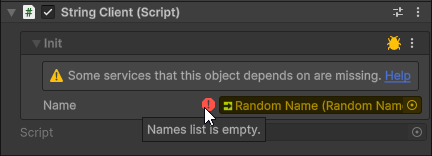
INullGuard is meant for value providers that provide a single type of value (IValueProvider<TValue> and IValueProviderAsync<TValue>). If your value provider can provide many types of values, implement INullGuardByType (see Validating Values Provided By Type below) instead.
The result returned by EvaluateNullGuard is a NullGuardResult. The following results are available:
| Result | Meaning |
|---|---|
NullGuardResult.Passed |
The value can be provided. No issue was detected. |
NullGuardResult.Warning(message) |
A non-fatal issue was detected. A warning icon is shown next to the Init argument. |
NullGuardResult.Error(message) |
The value will not be available. An error icon is shown next to the Init argument. |
NullGuardResult.Exception(exception) |
An exception occurred while probing for the value. |
Because the result is only consumed by editor tooling, it is common to implement the interface explicitly and to wrap the implementation in an #if UNITY_EDITOR block, so that it is stripped from builds.
INullGuardByType
Just like single-value providers can implement INullGuard, value providers that implement IValueByTypeProvider or IValueByTypeProviderAsync can implement INullGuardByType to tell the Inspector when they won’t be able to provide a value to a client.
The difference is that the check is generic: the type of the requested value is passed to the method as a type parameter, so that the result can depend on what the client is asking for.
public interface INullGuardByType
{
    NullGuardResult EvaluateNullGuard<TValue>([AllowNull] Component client);
}
The client argument is the component the value is being resolved for. It is null if the check is being performed in a context that doesn’t have a client, such as when the value provider is assigned to a loose Any<T> field.
The following value provider attaches a new component to the client if it doesn’t already have one, and uses INullGuardByType to explain to the user why it can’t be used in situations where this would not be possible:
using Sisus.Init;
using UnityEngine;

[CreateAssetMenu]
class GetComponent : ScriptableObject, IValueByTypeProvider
    #if UNITY_EDITOR
    , INullGuardByType
    #endif
{
    public bool TryGetFor<TValue>(Component client, out TValue value)
    {
        if(!client)
        {
            value = default;
            return false;
        }

        if(Find.In(client, out value))
        {
            return true;
        }

        value = default;
        return false;
    }

    #if UNITY_EDITOR
    NullGuardResult INullGuardByType.EvaluateNullGuard<TValue>(Component client)
    {
        if(!client)
        {
            return NullGuardResult.Error($"{nameof(GetOrAddComponent)} only supports clients attached to GameObjects.");
        }

        if(!typeof(Component).IsAssignableFrom(typeof(TValue)) && !typeof(TValue).IsInterface)
        {
            return NullGuardResult.Error($"{nameof(GetOrAddComponent)} only supports component and interface type values. {typeof(TValue).Name} is not supported.");
        }

        return NullGuardResult.Passed;
    }
    #endif
}
The same NullGuardResult values that can be used with INullGuard can be used here as well: Passed, Warning, Error and Exception.
A value provider is free to implement both INullGuard and INullGuardByType, if it has some checks that apply regardless of the requested type, and some that depend on it.
Asynchronous Value Providers
Some values can’t be provided immediately. An addressable asset needs to be loaded, a database query needs to be answered, a service needs to finish initializing. For these situations there are asynchronous value providers.
When an Init argument is provided by an asynchronous value provider, the Initializer takes care of everything: it starts the request when the client is being initialized, keeps the client disabled while the value is being awaited, and then initializes the client and enables it once all of its arguments have become available. Clients themselves never need to know that anything asynchronous was involved.
IValueProviderAsync<TValue>
IValueProviderAsync<TValue> is the asynchronous counterpart of IValueProvider<TValue>. Instead of a Value property, it has a single GetForAsync method that returns an Awaitable<TValue>:
Awaitable<TValue> GetForAsync(Component client, CancellationToken cancellationToken = default);
In Unity versions older than 2023.1, where Awaitable is not available, the method returns Task<TValue> instead.
The client argument is the component the value is being retrieved for, or null if the request doesn’t originate from a component. The cancellationToken is cancelled if the value is no longer needed – for example because the client was destroyed while the value was still being loaded. Value providers should observe it, and stop work early when possible.
using System.Threading;
using Sisus.Init;
using UnityEngine;

[CreateAssetMenu]
class LoadSpriteFromResources : ScriptableObject, IValueProviderAsync<Sprite>
{
    [SerializeField] string path;

    public async Awaitable<Sprite> GetForAsync(Component client, CancellationToken cancellationToken = default)
    {
        var request = Resources.LoadAsync<Sprite>(path);
        await request;
        cancellationToken.ThrowIfCancellationRequested();
        return request.asset as Sprite;
    }
}
If the value provider is unable to provide a value, it should return null (or the default value of TValue).
Asynchronous value providers can also be used with Any<TValue> fields. To retrieve the value, use the GetValueAsync method (or simply await the Any<TValue> object itself):
class AsyncClient : MonoBehaviour
{
    [SerializeField] Any<Sprite> sprite;

    async void Start()
    {
        Sprite value = await sprite.GetValueAsync(this);
        GetComponent<SpriteRenderer>().sprite = value;
    }
}
IValueByTypeProviderAsync
IValueByTypeProviderAsync is the asynchronous counterpart of IValueByTypeProvider. It has a generic GetForAsync<TValue> method that gets called with the type of the value that the client needs:
Awaitable<TValue> GetForAsync<TValue>(Component client, CancellationToken cancellationToken = default);
The following value provider loads whichever type of Unity asset the client requires from the Resources folder:
using System;
using System.Threading;
using Sisus.Init;
using UnityEngine;
using Object = UnityEngine.Object;

[CreateAssetMenu]
class LoadFromResources : ScriptableObject, IValueByTypeProviderAsync
{
    [SerializeField] string path;

    public async Awaitable<TValue> GetForAsync<TValue>(Component client, CancellationToken cancellationToken = default)
    {
        var request = Resources.LoadAsync(path, typeof(TValue));
        await request;
        cancellationToken.ThrowIfCancellationRequested();
        return request.asset is TValue value ? value : default;
    }

    bool IValueByTypeProviderAsync.IsValueTypeSupported(Type valueType)
        => typeof(Object).IsAssignableFrom(valueType);
}
Just like with IValueByTypeProvider, the IsValueTypeSupported and GetSupportedValueTypes methods can be overridden to let the Inspector know which types of values the value provider supports.
Init(args) ships with several value providers that implement IValueByTypeProviderAsync. Wait For Service, for example, is a small one that you can use as a reference: it simply delays the initialization of the client until the requested service becomes available.
Releasing Values
Some values need to be given back when the client that received them no longer needs them. A value could have been taken from an object pool, it could be backed by unmanaged memory, or it could be an addressable asset whose reference count needs to be decremented.
Value providers can handle this by implementing IValueReleaser<TValue> (for providers of a single type of value) or IValueByTypeReleaser (for value providers that provide values by type) in addition to the value provider interface itself. This works with both synchronous and asynchronous value providers.
IValueReleaser<TValue>
IValueReleaser<TValue> has a single method, Release, that receives the client that was using the value and the value itself:
void Release(Component client, TValue value);
Init(args) calls this method for you when the client is destroyed. As with all value provider methods, client can be null if the requester was unknown or wasn’t a component.
Here is an example of a value provider that hands out lists from a shared pool, and takes them back when the client no longer needs them:
using System.Collections.Generic;
using Sisus.Init;
using UnityEngine;
using UnityEngine.Pool;

[CreateAssetMenu]
class PooledPositionList : ScriptableObject, IValueProvider<List<Vector3>>, IValueReleaser<List<Vector3>>
{
    public List<Vector3> Value => ListPool<Vector3>.Get();

    public void Release(Component client, List<Vector3> positions) => ListPool<Vector3>.Release(positions);
}
Releasing also works with asynchronous value providers. This is how the built-in Addressables value providers make sure that an addressable asset stays loaded for as long as at least one client needs it, and gets released once the last client has been destroyed. Here is a simplified version of the idea:
using System.Collections.Generic;
using System.Threading;
using Sisus.Init;
using UnityEngine;
using UnityEngine.AddressableAssets;

[CreateAssetMenu]
class LoadSprite : ScriptableObject, IValueProviderAsync<Sprite>, IValueReleaser<Sprite>
{
    [SerializeField] AssetReferenceSprite sprite;

    readonly HashSet<Component> clients = new();

    public async Awaitable<Sprite> GetForAsync(Component client, CancellationToken cancellationToken = default)
    {
        clients.Add(client);
        var loadTask = sprite.IsValid() ? sprite.OperationHandle.Convert<Sprite>().Task : sprite.LoadAssetAsync().Task;
        var result = await loadTask;
        cancellationToken.ThrowIfCancellationRequested();
        return result;
    }

    public void Release(Component client, Sprite value)
    {
        if(clients.Remove(client) && clients.Count == 0 && sprite.IsValid())
        {
            sprite.ReleaseAsset();
        }
    }
}
IValueByTypeReleaser
IValueByTypeReleaser is the counterpart of IValueReleaser<TValue> for value providers that provide values by type. Its Release method is generic, and receives the type of the value as a type parameter:
void Release<TValue>(Component client, TValue value);
The following value provider creates a new instance of whichever ScriptableObject type the client needs, and destroys it again once the client is no longer using it:
using System;
using Sisus.Init;
using UnityEngine;

[CreateAssetMenu]
class CreateScriptableObject : ScriptableObject, IValueByTypeProvider, IValueByTypeReleaser
{
    public bool TryGetFor<TValue>(Component client, out TValue value)
    {
        if(!typeof(ScriptableObject).IsAssignableFrom(typeof(TValue)) || typeof(TValue).IsAbstract)
        {
            value = default;
            return false;
        }

        value = (TValue)(object)CreateInstance(typeof(TValue));
        return true;
    }

    public void Release<TValue>(Component client, TValue value)
    {
        if(value is UnityEngine.Object unityObject)
        {
            Destroy(unityObject);
        }
    }

    bool IValueByTypeProvider.IsValueTypeSupported(Type valueType)
        => typeof(ScriptableObject).IsAssignableFrom(valueType) && !valueType.IsAbstract;
}
When Are Values Released?
Values are released when the client that received them is destroyed.
If a value provider that is used to provide per-client services does not implement IValueReleaser or IValueByTypeReleaser, but the value it provides implements IDisposable or IAsyncDisposable, then the value is disposed when the client is destroyed instead.
Init Argument Menu Integration
You can also create a new item in the Init argument dropdown menu for the value provider by adding the [ValueProviderMenu] attribute to it.
[ValueProviderMenu(typeof(string)), CreateAssetMenu]
class RandomNameProvider : ScriptableObject, IValueProvider<string>
{
    public string Value => Random.Range(0, 5) switch
    {
        0 => "Alice",
        1 => "Bob",
        2 => "Charlie",
        3 => "Diana",
        _ => "Eve",
    };
}
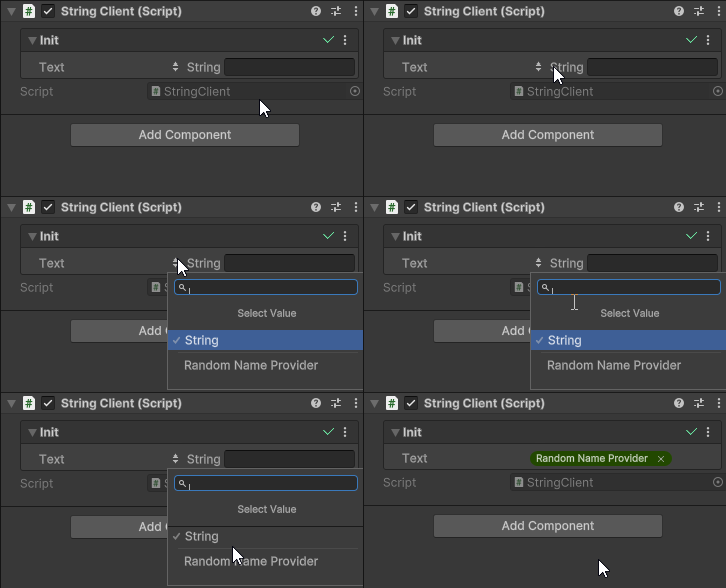
Value providers that provide values by type can use the attribute to control which Init arguments the menu item appears for, based on the type of the argument. For example, this adds a menu item named “Get From GameObject By Tag” to the dropdown of every Init argument whose type can be a scene object:
[ValueProviderMenu("Get From GameObject By Tag", Is.SceneObject), CreateAssetMenu]
class GetFromGameObjectByTag : ScriptableObject, IValueByTypeProvider
{
    ...
}